Track profit on your phone: UK tradespeople’s weekly HMRC routine
Track your profit by opening a separate business account, recording every sale and allowable cost digitally as it happens, and reconciling weekly. Cash basis accounting is the default method for most sole traders, and it’s also the trigger point for Making Tax Digital once your income crosses the thresholds. Start today: capture this week’s receipts into your phone before they end up as a receipt stuffed in a glovebox.
TL;DR:
- Keep invoices, receipts, bank statements, and mileage logs for five years after the January 31 filing deadline; a 2025–26 return is retained until early 2032.
- Cash basis suits straightforward cash flow, but businesses with large unpaid invoices at year end may prefer traditional accounting; switching methods needs careful transition adjustments.
- The £1,000 trading income allowance replaces itemized expenses, so sole traders cannot claim both; fines and client entertainment are not allowable.
- Making Tax Digital starts April 6, 2026, for qualifying income of £50,000 or more; thresholds fall to £30,000 in 2027 and £20,000 in 2028.
- Each month, move 25%–30% of cleared profit into a tax reserve, then compare upcoming bills and material costs against your cash flow forecast.
Table of Contents
- What records you must keep and why
- Cash basis vs traditional accounting: which suits your business
- How to calculate profit and taxable profit for SA103
- Tools and systems that make profit tracking repeatable
- A weekly, monthly and quarterly routine for reliable figures
- Making Tax Digital for Income Tax: who, when and what to do
- Common mistakes and quick tips to protect your profit
- How TradeTally implements the system for UK tradespeople
- Why simple mobile capture beats complex spreadsheets for trades
- Try TradeTally: start tracking profit from today
- FAQ
- Sources
What records you must keep and why
HMRC doesn’t ask for much imagination here, just consistency. If you’re self-employed, you need to keep accurate records of everything that moves money in or out of your business, and you need to be able to produce them if asked.
The list is fairly predictable once you’ve done a tax return or two:
- Sales invoices and records of all business income, including cash jobs.
- Receipts for materials, tools, fuel and other allowable expenses.
- Bank statements for any account used for business transactions.
- CIS deduction statements, if you work under the Construction Industry Scheme.
- Mileage logs for any vehicle used for work journeys.
- Insurance documents and purchase invoices for equipment or vans.
The retention rule matters more than most sole traders realise: you need to keep these records for five years after the 31 January submission deadline for the relevant tax year. For a 2025-26 return filed by 31 January 2027, that means holding onto everything until early 2032.
That long window exists because HMRC can open an enquiry well after you’ve filed, and the burden sits with you to prove the numbers were right. A missing receipt for a £400 generator doesn’t sink a return on its own, but a pattern of missing records starts to look like guesswork rather than bookkeeping, and that’s when a routine enquiry turns into a longer one.
Good records do double duty. They satisfy HMRC, and they give you an honest answer to the question that actually keeps a trades business running: are you making money on the jobs you’re taking, or just staying busy?
Cash basis vs traditional accounting: which suits your business
Two methods exist for recording income and expenses, and the difference comes down to timing.
Cash basis records a transaction when the money actually moves. You invoice a customer in March, they pay in April, and that income counts in the tax year you were paid. Cash basis is now the default method for sole traders from the 2024-25 tax year onwards, and for most trades businesses it’s also the simplest to run day to day, since your bank balance and your profit figure tend to tell a similar story.
Traditional accounting, sometimes called accruals, records income and expenses when they’re earned or incurred, regardless of when cash lands. An invoice raised in March counts as March income even if it’s not paid until June.
- Cash basis suits businesses with straightforward cash flow and few large outstanding invoices.
- Traditional accounting suits businesses carrying significant unpaid invoices at year end, where cash basis profit can look healthier than the business actually is.
If you’ve got a few big commercial jobs sitting unpaid at 5 April, cash basis profit can understate how much work you’ve actually done, which matters for your own management decisions even if the tax position is fine. Switching method isn’t something to do lightly; it needs careful adjustment to avoid double-counting income or expenses in the transition year, so get this checked before you change anything, as covered in our cash basis accounting guide.
Pro Tip: If you’re not sure which method you’re using right now, check last year’s tax return: most sole traders default to cash basis without realising it.
How to calculate profit and taxable profit for SA103
The arithmetic behind your tax return isn’t complicated, but it does need to be done in the right order. The SA103 self-employment notes walk through exactly which boxes correspond to which figures.
- Add up your turnover. This goes in box 15 (short version) or box 9 (full version) and includes all business income received in the tax year, before any costs are deducted.
- Total your allowable expenses. Group costs like materials, tools, vehicle running costs, insurance and subcontractor payments. Some costs are only partly allowable, such as a vehicle used for both business and personal journeys, and some, like fines or client entertainment, aren’t allowable at all.
- Calculate net profit. Subtract total allowable expenses from turnover, then apply any adjustments, such as capital allowances, to reach your taxable profit, which transfers to the relevant SA103 boxes.
If your turnover is small, the trading income allowance lets you deduct a flat £1,000 instead of itemising expenses, though you can’t use both. If the sums come out negative, that’s a trading loss, which can usually be carried forward or set against other income, something worth discussing with an accountant if it’s the first time it’s happened.
Tools and systems that make profit tracking repeatable
The minimum toolkit for reliable profit tracking is smaller than most sole traders assume: a way to capture receipts from your phone, a way to raise invoices, a bank feed that pulls transactions in automatically, and a simple profit and loss view you can check without opening a spreadsheet.
Each piece earns its place. Receipt capture on your phone means the £60 fitting you bought at the merchant’s on Tuesday gets recorded before the paper goes through the wash. A bank feed catches payments you might forget to log manually, like a card payment for diesel on a Sunday. A running profit and loss view turns a shoebox of numbers into a figure you can actually act on, whether that’s pricing the next quote or deciding whether you can afford a new drill.
Setting this up properly takes less time than most people fear:
- Create a short list of expense categories that match how you actually spend (materials, fuel, tools, insurance, subcontractors).
- Tag every transaction consistently, even the small ones, rather than batching “sundries” at year end.
- Set a fixed day each month for reconciliation, so the bank feed and your records never drift far apart.
Pro Tip: Snap the receipt the moment you’re handed it. A photo taken in the van takes ten seconds; chasing down a faded receipt in January takes an evening you didn’t plan for.
A weekly, monthly and quarterly routine for reliable figures
Profit tracking falls apart when it only happens once a year. A short, repeated routine keeps the numbers current and makes year-end almost uneventful.
- Weekly: capture receipts as you get them, raise invoices for completed work, chase anything unpaid, and do a quick reconciliation against your bank feed.
- Monthly: review your profit and loss in full, set aside 25-30% of cleared profit into a tax pot, and check your cash flow forecast against upcoming bills and materials costs.
- Quarterly: if you’re within scope for Making Tax Digital, prepare and submit your quarterly update; otherwise use the quarter as a checkpoint to tidy records and flag anything unusual before it becomes a January scramble.
The weekly step matters most, because it’s the one most likely to slip. A missed receipt or an unchased invoice is easy to fix after a week; after three months it’s a guessing game. Building the habit into the end of each working day, even just five minutes, keeps the whole system honest without adding a second job on top of the trade itself.
Making Tax Digital for Income Tax: who, when and what to do
Making Tax Digital for Income Tax changes how often you report to HMRC, from one annual return to quarterly digital updates. MTD for Income Tax requires digital record-keeping and submission through compatible software rather than a one-off annual form.
Eligibility phases in by qualifying income, which is your gross income from self-employment and property before expenses:
- £50,000 and above: in scope from 6 April 2026.
- £30,000 and above: in scope from April 2027.
- £20,000 and above: in scope from April 2028.
Sole traders and landlords with qualifying income above these thresholds are being urged to prepare ahead of the rollout dates, since switching to digital records takes longer when it’s done under deadline pressure; see our sole trader transition guide for Making Tax Digital for practical help.
A quarterly update is a summary of income and expenses for that period, submitted through compatible software rather than typed into a web form. The first update under the standard quarters is due by 7 August 2026 for those in scope from April that year. Use the GOV.UK eligibility checker to confirm your sign-up date, and get your digital records in place well before your first deadline rather than the week of it.

Common mistakes and quick tips to protect your profit
A handful of habits cause most of the profit-tracking problems we see in trades businesses, and all of them are fixable before they bite.
- Mixing personal and business spending in one account makes every reconciliation slower and every HMRC enquiry harder to answer cleanly.
- Guessing the business proportion of vehicle or home costs instead of using HMRC’s simplified expenses rates, which replace detailed calculations for mileage and home working costs.
- Filing a receipt with no note of what it was for, leaving you trying to remember six months later why you spent £85 at a builders’ merchant.
Pro Tip: Open a second bank account used only for business, even if you’re not required to. It turns reconciliation from a forensic exercise into a five-minute check.
How TradeTally implements the system for UK tradespeople
We built TradeTally around the routine above, not as an afterthought but as the point of the app. Core features map directly onto it:
- Instant invoicing from site, so a completed job gets billed the same day.
- Receipt capture through your phone camera, tagged and categorised as you take the photo.
- A live profit dashboard that updates as invoices and receipts come in, rather than once a year.
- Automatic SA103F export, formatted for handover to an accountant or direct submission.
A typical day looks like this: finish the job, raise the invoice from the van, snap the receipt for materials bought that morning, and let the weekly reconciliation happen almost by itself.
Why simple mobile capture beats complex spreadsheets for trades
Spreadsheets work until the end of a long day on site, when nobody wants to type anything. The tradespeople who keep the cleanest records are usually the ones who capture data in seconds, not minutes, and a phone in your pocket beats a laptop you’ll open “later”. That one change saves hours at year end and removes most of the January surprises.
— Simon
Try TradeTally: start tracking profit from today
Everything in this guide, the receipts, the invoices, the weekly reconciliation, the SA103F export, is what we built TradeTally to handle without you needing a second system bolted on top. Mobile invoicing lets you bill a customer before you’ve left the drive, receipt capture takes the photo-and-forget habit and turns it into tax-ready records, and the SA103F export means handover to your accountant is a file, not a shoebox.
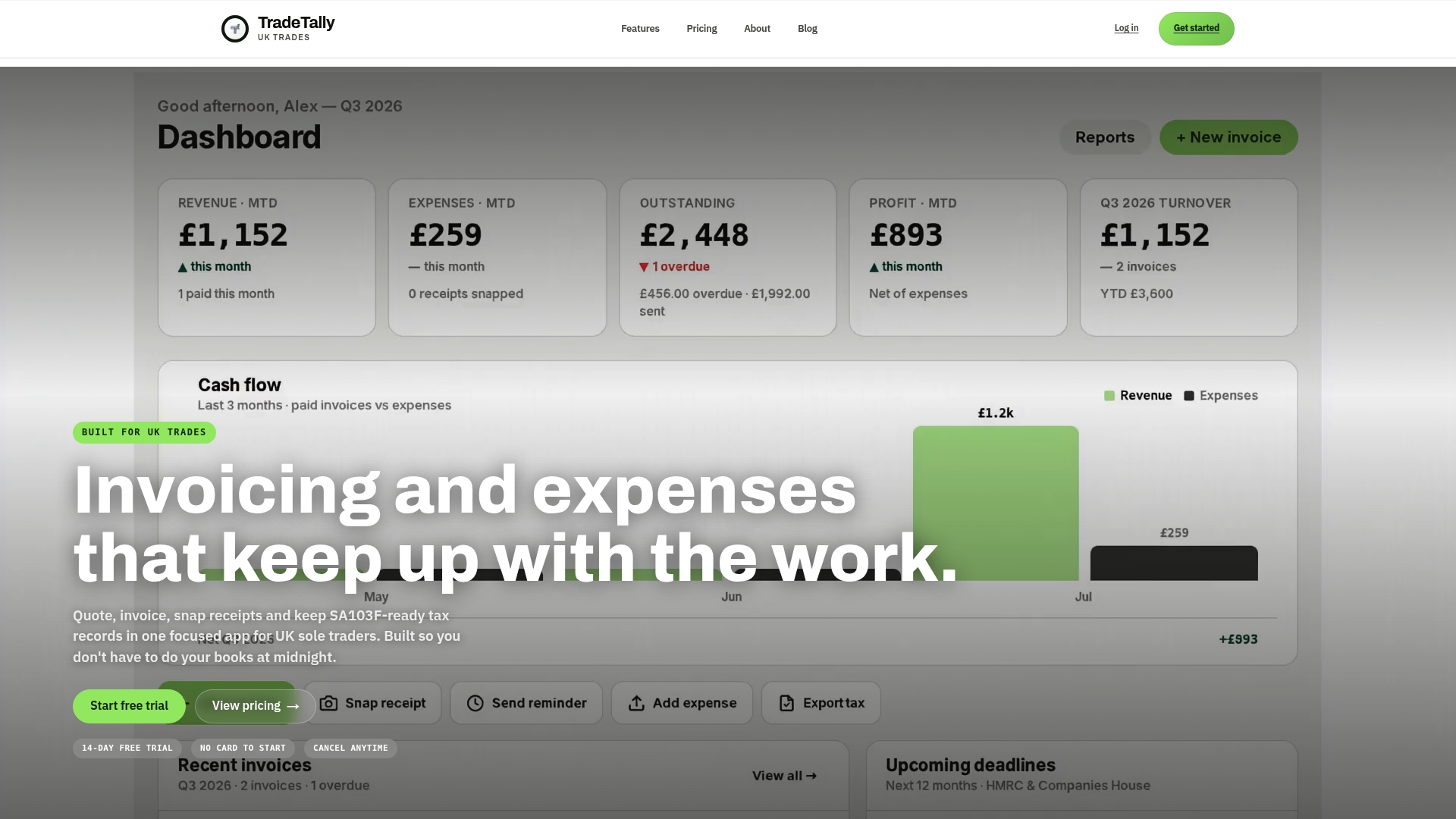
Our Starter plan is free and covers limited invoicing if you want to see the workflow before committing. The Professional plan runs £12 per month or £120 per year and unlocks unlimited invoices, receipts and tax exports, as listed on our pricing page. Take a look at the full feature set on the TradeTally homepage and set up your first invoice this week.
This article is general information, not a substitute for advice from a qualified financial advisor. Consult a qualified financial professional about your own circumstances before acting on anything here.
FAQ
Who keeps the profit in a sole trader business?
As a sole trader, you keep all the profit your business makes, since there’s no legal separation between you and the business. This is different from a limited company, where profit belongs to the company until it’s paid out as salary or dividends.
What is the best accounting software for sole traders in the UK?
The right software depends on your trade and how you work, but for tradespeople the most useful tools combine mobile receipt capture, invoicing and tax-ready exports in one place. Look for something built around quick capture on site rather than desk-based spreadsheet work, since that’s where most record-keeping breaks down.
What are the new rules for sole traders in the UK?
The main change is Making Tax Digital for Income Tax, which phases in quarterly digital reporting instead of one annual return. It applies from 6 April 2026 for qualifying income above £50,000, then extends to £30,000 from April 2027 and £20,000 from April 2028.
Do I need to tell HMRC I’m a sole trader?
Yes, you need to register as self-employed with HMRC once you start trading, so you can file Self Assessment returns and pay the right tax and National Insurance. You’ll also need to keep digital or paper records of your income and expenses from the point you register.
Sources
Recommended
Ready to sort your trade admin?
TradeTally gives UK sole traders invoicing, expenses, and SA103F-ready tax exports in one mobile-first app.
Start 14-day Pro trial →No card required