Invoice Branding That Stays HMRC-Safe
Invoice branding means designing your invoices with consistent colours, your logo, and clear layout so every bill you send looks like it came from a professional outfit, not a template someone else left behind. Done well, it speeds up payment and builds trust with clients. Done badly, and it hides mandatory HMRC details behind poor contrast or clutter. The details required by law must always stay visible, whatever your colour scheme.
TL;DR:
- Well-branded invoices can help speed up payments by an average of five to seven days and improve on-time payment rates.
- Mandatory legal details such as invoice number, business and customer information, supply date, and total owed must remain clear and legible in all designs.
- High-contrast totals and consistent templates across invoices prevent delays, disputes, and confusion with clients.
- Testing invoices on multiple devices and ensuring mobile-friendly design reduces the risk of late payments caused by unreadable or hidden totals.
- Using software that automates branding and keeps mandatory fields fixed helps maintain compliance and professional consistency easily.
Table of Contents
- Why branded invoices matter for your business
- What legally must appear on an invoice in the UK
- Design elements that make a branded invoice both attractive and readable
- How to create and use a branded invoice template step by step
- Common invoicing mistakes to avoid when you brand invoices
- Tips for maintaining brand consistency across all invoice communications
- Tools and software recommendations for creating branded invoices
- How to test and get feedback on your invoice design before finalising
- Considerations for mobile-friendly and digital invoice branding
- Author perspective: why TradeTally designs invoicing for tradespeople
- How TradeTally helps sole traders create compliant, branded invoices quickly
- Sources
- FAQ
Why branded invoices matter for your business
Clients pay people they trust before people they don’t recognise. A logo, consistent colours, and a familiar layout tell the person opening that email: “You know this business, you’ve dealt with them before, this is safe to pay.” That recognition does practical work, not just cosmetic work.
There’s a behavioural reason branding speeds up payment too. Accounts payable staff, whether that’s a homeowner scrolling on their phone or an office manager processing a stack of supplier invoices, scan for the total due before they read anything else. A clear hierarchy that puts the total, due date, and invoice number front and centre reduces the seconds it takes to find what matters, and fewer seconds spent hunting means fewer invoices left “to deal with later.”
Statistic callout: Industry analysis of invoice design and payment behaviour found that branded, well-structured invoices get paid roughly 5 to 7 days faster on average, with on-time payment rates rising significantly compared with generic templates.
Beyond speed, consistency reduces disputes. When every invoice you send follows the same structure, clients stop asking “wait, what’s this line for?” because they already know where to look. That familiarity:
- Cuts back-and-forth emails querying line items or totals
- Builds a professional impression that supports repeat business
- Makes your invoices instantly recognisable in a crowded inbox
- Reduces the chance a client mistakes your bill for spam or a scam attempt
What legally must appear on an invoice in the UK
Before you touch a single colour swatch, get the compliance basics locked down. Gov, and none of these fields are optional, however sleek your template looks.
- A unique invoice number that follows a sequential series, never reused
- Your business name, address, and contact details
- The customer’s name and address
- A clear description of the goods or services provided
- The date of supply (sometimes called the “tax point”)
- The invoice date
- The total amount owed, shown unambiguously
If you’re VAT-registered, HMRC’s VAT manual adds further requirements: your VAT registration number, the VAT rate applied, and the VAT amount charged, either per line or as a total. Sequential numbering isn’t just good practice here. HMRC specifically expects a numbering system that uniquely identifies each invoice you issue, with no gaps that can’t be explained.
Keep copies of every invoice you send, ideally as exported PDFs stored alongside your other business records. That habit does double duty: it protects you if a client disputes a payment, and it keeps your books ready for Self Assessment or Making Tax Digital compliance when the time comes.
Design elements that make a branded invoice both attractive and readable
Good invoice design isn’t about making things pretty. It’s about making the important bits impossible to miss while your brand personality sits quietly in the background.
Start with your logo. Use a high-resolution PNG file with a transparent background so it sits cleanly on any coloured header without a white box around it. Place it top left or top right, consistently, every single time.
Colour and contrast come next. Keep your brand’s signature colour, but test it against white or pale backgrounds to make sure small text and totals stay legible. A pale grey total on a pale grey background looks smart on a monitor and disappears completely on a phone screen in bright daylight, which is exactly where most clients will actually read it.
Visual hierarchy decides what the eye lands on first. Your total due, due date, and invoice number should be the largest, boldest elements on the page. Everything else, the line items, your terms, your VAT breakdown, supports that hierarchy rather than competing with it.
A few optional extras can add polish without adding clutter:
- A light watermark (your logo at low opacity) reinforces brand recognition without distracting from totals
- Footer terms remind clients of payment deadlines and late fees
- A QR code linking to a payment portal speeds up settlement, though it’s worth testing that it scans cleanly on a printed copy too
If you can’t instantly spot the total due at that size, neither can they.*
How to create and use a branded invoice template step by step
Building a template once and reusing it properly saves hours over a working year, and it stops you sending a client last month’s mismatched design by accident.
- Choose your starting point. Accounting software (most platforms call these “branding themes”), a locked PDF template, a Word or Google Docs file, or a mobile invoicing app built for tradespeople all work, but pick one system and commit to it.
- Save your brand assets in one place. Keep your logo file (PNG, transparent background), your colour hex codes, and your chosen font names somewhere you can find them in seconds, not buried in an old design brief.
- Set your template as the default in whatever software you use. Xero, for example, calls this a branding theme that applies automatically to every new invoice you raise.
- Preview before you send anything live. Check the layout on desktop and on a phone screen, then export a test PDF and open it fresh, not just in the software’s preview pane, since rendering can shift between the two.
- Standardise delivery. Use the same email subject line format and message body every time, attach your terms, and set automated reminders for anything left unpaid past the due date.
Keep a dated copy of every invoice you send, whether that’s an automatic archive in your software or a folder of exported PDFs. It’s the same habit that keeps your VAT and Self Assessment records straight when your accountant, or you, come looking for them.
Common invoicing mistakes to avoid when you brand invoices
Branding goes wrong in a handful of predictable ways, and most of them are easy to catch before you hit send.
- Hiding mandatory fields. Never shrink, recolour, or remove your invoice number, VAT details, or dates to make a design look cleaner. HMRC compliance isn’t negotiable, however good the layout looks.
- Low-contrast totals. A stylish pale colour scheme that hides your total due on a phone screen costs you money in delayed payments.
- Inconsistent templates. Sending three different invoice layouts to the same client in one quarter reads as disorganised, even if the work was excellent.
- Skipping the PDF test. Always export and reopen the final file before sending. Software previews and exported PDFs don’t always match.
- Losing original copies. Keep every invoice archived. You’ll need them for tax records long after the job’s forgotten.
Tips for maintaining brand consistency across all invoice communications
Your invoice is only one touchpoint in a longer conversation with a client, and it should read like the same voice they heard in your quote and your follow-up emails.
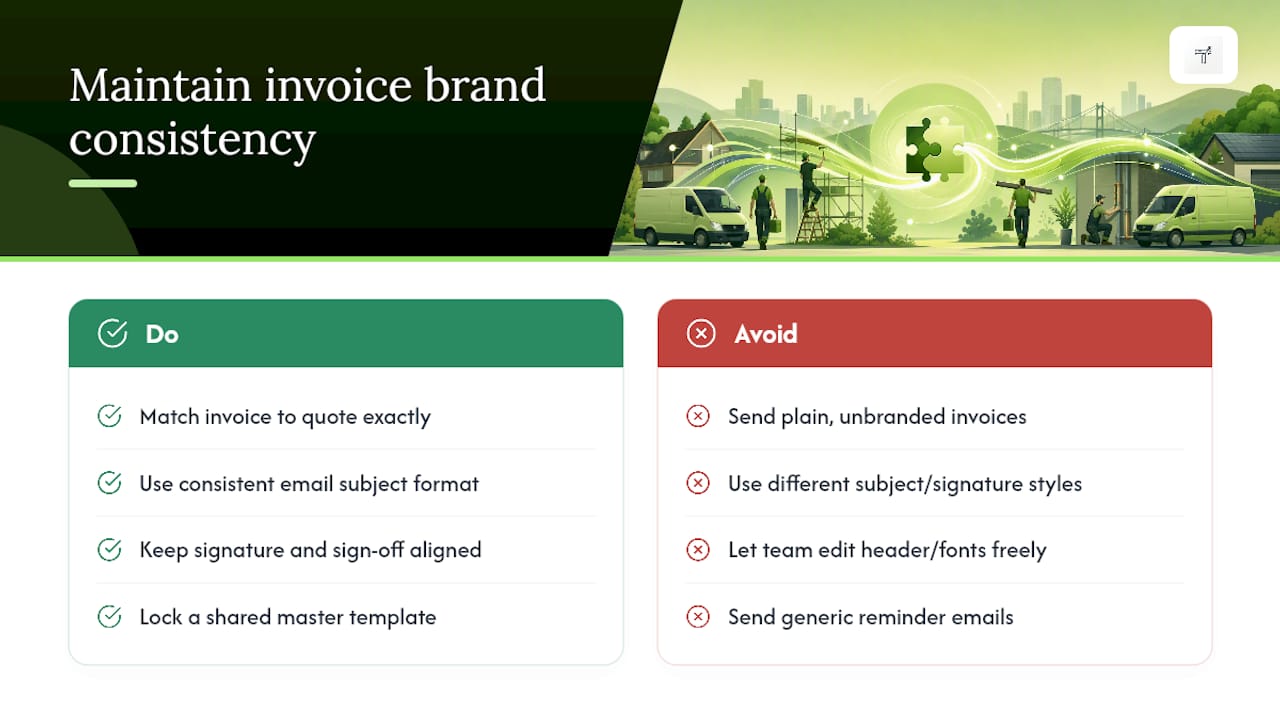
Start with the paper trail that leads up to the invoice. If your quote uses your brand colours and logo, your invoice should match exactly, same fonts, same header layout, same tone of language in the terms. A client who receives a smart branded quote followed by a plain, unbranded invoice notices the drop, even if they can’t quite say why it feels off.
Apply the same discipline to email delivery. Use one consistent subject line format (something like “Invoice [number] from [your business name]”) and keep your email signature, sign off, and even your out-of-office message aligned with the same visual identity. Treat the invoice as a genuine touchpoint in the customer journey, not an administrative afterthought bolted on once the job’s done.
If you work with a small team, or you’re the only one issuing invoices but do it from more than one device, lock your template down so nobody accidentally edits the header, swaps a font, or reverts to a default layout halfway through a busy month. A shared, locked master template is the simplest safeguard against drift.
Reminder emails deserve the same attention. A polite, branded reminder that mirrors your invoice’s look reinforces professionalism even when you’re chasing a late payment, whereas a scrappy generic nudge can undercut the good impression the original invoice created.
Tools and software recommendations for creating branded invoices
You don’t need design software to get this right. Most accounting platforms build branding directly into their invoicing feature, letting you upload a logo, pick colours, and lock a layout as your default template, sometimes labelled a “branding theme” rather than a template, but functionally the same thing.
For freelancers running a lean setup, a well-built PDF or Google Docs template can do the job, provided you’re disciplined about saving it as a locked master file rather than editing a fresh copy every time. The risk with this route is drift: small tweaks creep in over months, and eventually your March invoice looks nothing like your November one.
Mobile-first apps built specifically for tradespeople solve a different problem: raising an invoice on-site, before you’ve even left the driveway, rather than typing it up that evening from memory. Purpose-built invoicing tools for tradesmen combine a saved branded template with instant sending, which matters when speed to invoice is itself a factor in speed to payment.
Whichever route you choose, prioritise software that lets you save your branding once and apply it automatically, rather than one that asks you to rebuild the design from scratch every time you bill a client.
How to test and get feedback on your invoice design before finalising
Never finalise a template on the strength of how it looks on your own laptop screen. Test it the way your clients will actually encounter it.
Send yourself a real test invoice and open it on at least two devices, a desktop and a phone, in both your email client and as a downloaded PDF. Rendering differences between software and exported files are common, and poor mobile rendering or hidden totals in exported PDFs are a frequent, quietly overlooked cause of late payment.
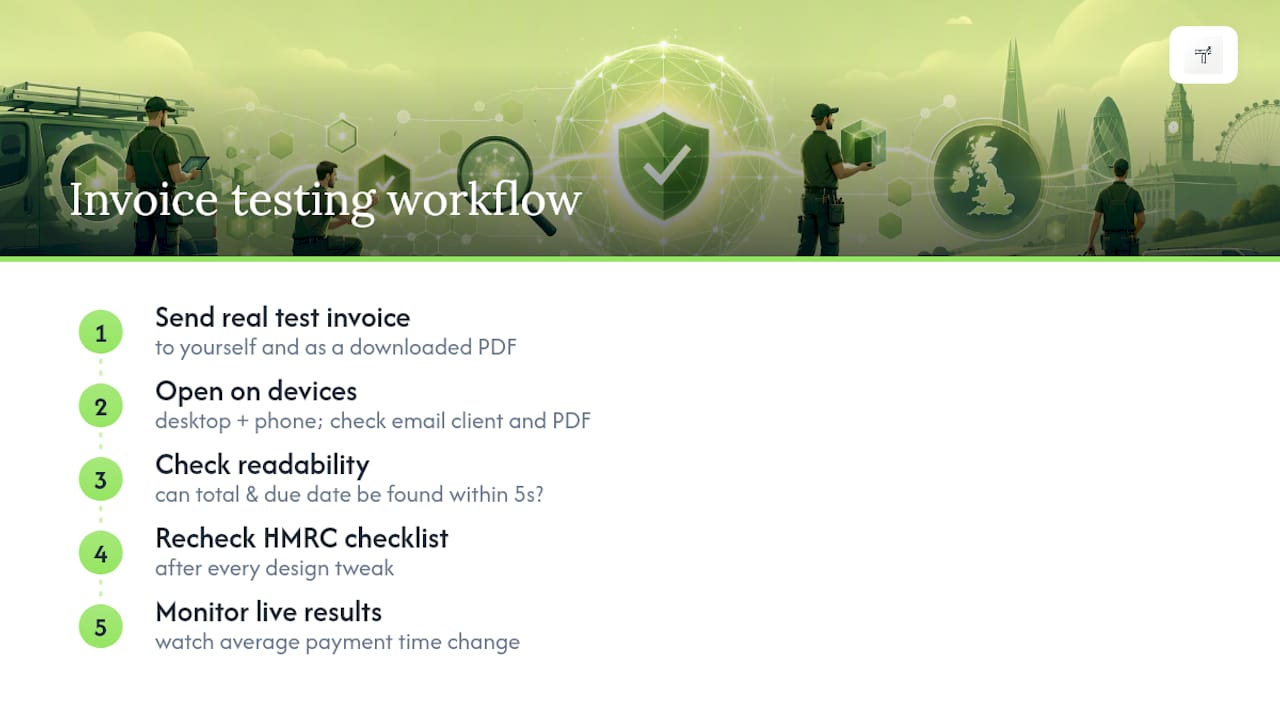
Ask a handful of existing clients, or a trusted colleague, whether they can spot the total due and the due date within five seconds of opening the file. If they hesitate, or scroll around hunting for numbers, that’s your signal to simplify the layout before you roll it out permanently.
Check your template against the HMRC checklist one more time after any design tweak. It’s easy to nudge a colour or resize a header and accidentally shrink a mandatory field in the process without noticing.
Finally, watch what actually happens once the new template goes live. If average payment time drops compared with your old invoices, that’s a stronger signal than any amount of opinion gathered beforehand.
Considerations for mobile-friendly and digital invoice branding
Most invoices today get opened on a phone first, often within minutes of being sent, frequently while the client is standing in their kitchen or sitting in a van between jobs. Design for that screen size first, not as an afterthought.
Keep your header compact. A full-width logo banner that looks smart on a desktop monitor can push your total due below the fold on a phone screen, forcing the client to scroll before they see the number that actually matters.
Font size deserves particular attention on mobile. Anything under 11 or 12 points on a phone screen tends to blur or require a pinch to zoom, and a client who has to zoom in to read your total is a client who’s more likely to set the email aside “for later.”
If you include a QR code for payment, test that it scans cleanly at the size it renders on a typical phone screen, not just on a printed A4 sheet. And if your invoice links to an online payment portal, check that the link opens correctly in mobile browsers, since some email apps mangle long tracking URLs.
Digital delivery also means thinking about file size. A logo exported at unnecessarily high resolution can bloat your PDF, slowing load times on a weak mobile signal, exactly the situation many tradespeople and their clients find themselves in on site.
Author perspective: why TradeTally designs invoicing for tradespeople
Most invoicing advice assumes you’re sitting at a desk. Tradespeople aren’t. They’re finishing a job, standing in a van, wanting to invoice before the memory of the work fades and before the client moves on to the next thing on their list. Mobile-first branded templates solve that specific problem rather than a generic office one.
Try a small experiment: brand one invoice properly, send it the same day you finish the job, and compare how quickly it gets paid against your usual approach.
— Simon
How TradeTally helps sole traders create compliant, branded invoices quickly
TradeTally is built for the exact problem this article has walked through: getting a professional, HMRC-compliant invoice out the door before the memory of the job fades, without wrestling with design software or a desktop template that only works from a desk.
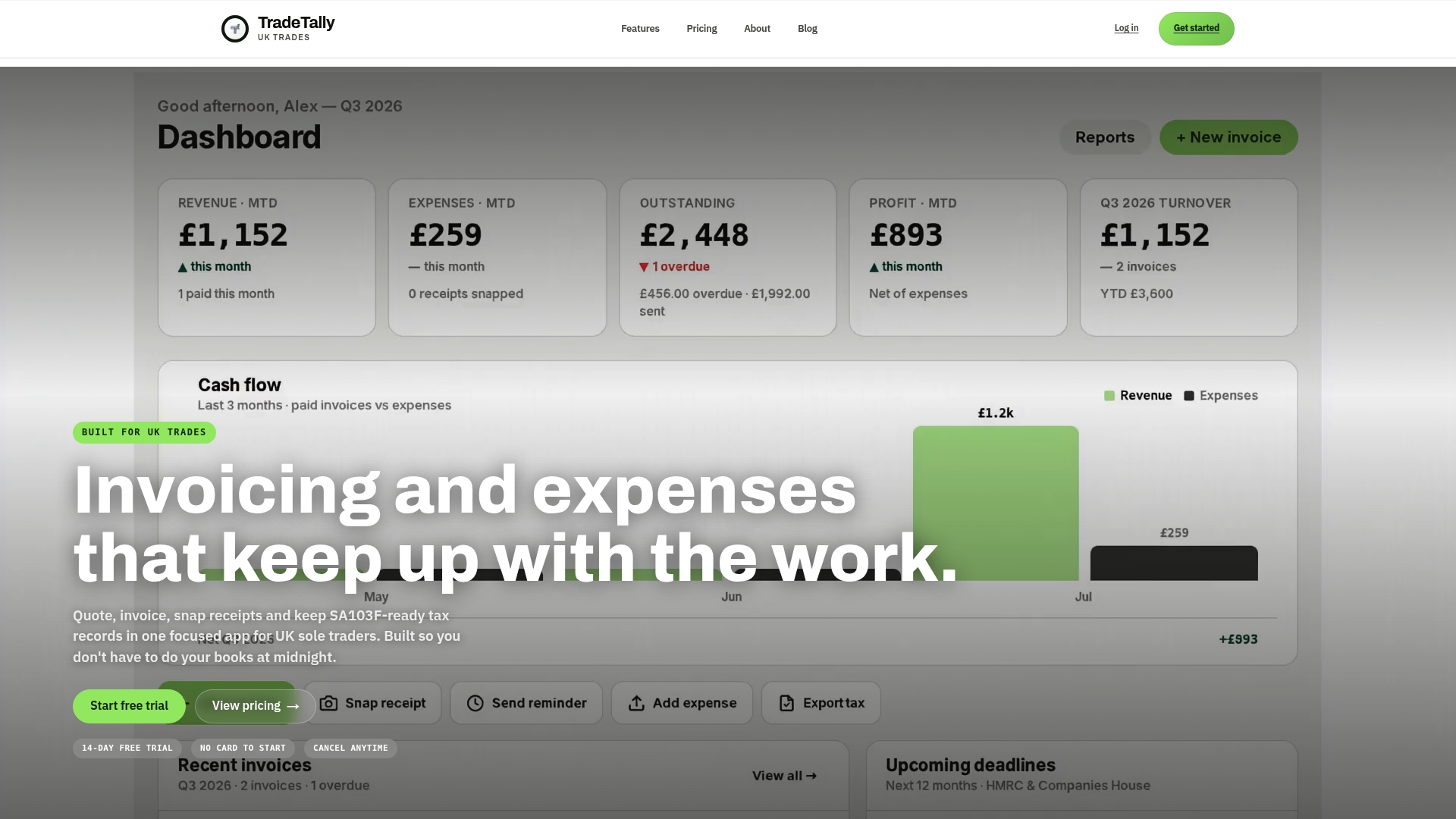
The app lets you set your logo and colours once, then raises every invoice from that same branded template automatically, whether you’re finishing up on-site or catching up that evening. Every field GOV.UK requires stays locked in, so you never have to choose between looking sharp and staying compliant. Beyond invoicing, TradeTally tracks receipts and expenses and exports tax-ready records, including SA103F, so Self Assessment season doesn’t turn into a scramble for missing paperwork.
It’s built specifically for UK sole traders in trades, plumbers, electricians, carpenters, and similar. If that’s you, take a look at TradeTally’s dedicated pages, such as the carpenter invoicing software or heating engineer invoicing tools, and see how a branded template built for your trade compares with what you’re using now.
Sources
- Gov
- Professional branding and invoice design psychology: Why the way you bill clients determines whether you get paid | eInvoice Blog
FAQ
How do I design my own invoice?
Start from an accounting software template or a locked master document, add a high-resolution logo, keep your brand colours legible against white, and make sure the total due and invoice number stand out clearly. Test the finished design on both desktop and mobile before you send it to a real client.
What is legally required on an invoice in the UK?
GOV.UK requires a unique invoice number, your business and customer details, a description of goods or services, the supply and invoice dates, and the total amount owed. VAT-registered businesses must also show their VAT number and the VAT charged.
What are the three types of invoice?
Common types include the standard invoice (for completed work), the pro forma invoice (a preliminary bill before work is confirmed), and the credit invoice (issued to refund or correct a previous invoice). Recurring invoices are also widely used for ongoing or subscription-style work.
What are common invoicing mistakes to avoid?
The most frequent errors are hiding mandatory HMRC fields behind low-contrast design, using inconsistent templates across clients, and failing to test how the PDF renders on mobile before sending. Some apps build compliant fields into the template by default, which removes most of that risk for sole traders.